BFCM 2026: Prepare Shopify Products for AI Shopping Agents
BFCM 2026 runs November 27 to 30. How to get Shopify product images and product data ready for ChatGPT, Gemini and other AI shopping agents before Black Friday.
By Craftshift Team · · 7 min read
To get Shopify products ready for AI shopping agents before BFCM 2026 (November 27 to 30), make sure every product you will promote has at least three images with alt text, a clear title, a complete description, the right category and full variant data, and finish the work before Black Friday week. AI agents compare products on the data the Shopify catalog returns, so a strong discount on a thin listing can be left out of the answer entirely.
We build three Shopify apps that cover this work at Craftshift: Export Product Images to audit and back up your product media, Smart Bulk Image Upload to fill the image gaps in bulk, and Octolift to score and fix product data for AI assistants. This post shows how they fit into a six-week BFCM plan.
What is BFCM and when is it in 2026?
BFCM stands for Black Friday Cyber Monday, the four-day sales weekend after US Thanksgiving. In 2026 it falls on these dates:
| Day | Date (2026) |
|---|---|
| Thanksgiving | Thursday, November 26 |
| Black Friday | Friday, November 27 |
| Small Business Saturday | Saturday, November 28 |
| Cyber Monday | Monday, November 30 |
For the meaning of the term, the full Cyber Week calendar and a general Shopify checklist, read our sister site’s guide What is BFCM? 2026 dates, meaning and Shopify prep checklist. This post focuses on one part of the preparation: AI shopping agents.
Why do AI shopping agents change BFCM preparation?
Shoppers now ask an assistant before they open a store. According to Adobe’s 2025 holiday report, traffic to US retail sites from generative AI tools rose 693% over the 2025 holiday season compared with 2024. Over the same weekend, Shopify merchants sold a record $14.6 billion during BFCM 2025.
When an agent searches, compares and sometimes checks out for the shopper, this is called agentic commerce. The agent does not look at your banner or your countdown timer. It reads structured product data and picks the products it can understand and trust. That makes catalog quality a BFCM task, not a year-round nice to have.
What do AI shopping agents read on a Shopify product?
An AI agent queries a product catalog and reads what comes back. These are the fields that decide whether your product reaches the shortlist, and the app that helps with each:
| What the agent reads | Why it matters | Where to fix it |
|---|---|---|
| Images and alt text | Alt text is how an agent reads a photo; three or more images give it enough to show | Audit with Export Product Images, add with Smart Bulk Image Upload |
| Title | The first thing matched against the shopper’s question | Octolift (Improve with AI) |
| Description | Materials, use cases and details the agent can quote | Octolift (Improve with AI) |
| Category and category fields | Lets the agent place the product in the right comparison | Octolift |
| Variants, price and availability | An agent will not recommend what it cannot confirm is in stock | Shopify admin, checked by Octolift |
| Shipping and return policies | Shoppers ask about delivery before BFCM orders | Published policy pages, checked by Octolift |
| Reviews | A trust signal agents weigh when comparing | Your review app, checked by Octolift |
How do you audit product images before BFCM?
Start with a copy of what is live. Export Product Images downloads the images, videos and 3D models of your products as one ZIP, and the preview lists every file with its product, status, position, SKU and stock before you export.
- Open Export product files and keep Include images on.
- Set Select status to Active and tick Export only products with stock, so the list matches what you can sell on Black Friday. Add a collection filter if your offers live in one collection. All filters are listed in export product media.
- Press Preview files and check the summary: the number of products found and the number of images.
- On the preview page, choose the Product title folder layout (see file names and folders) and press Export files.
- Download the ZIP from the email. With one folder per product, products that have only one or two images stand out at a glance.
The ZIP is also your restore point. If a bulk change goes wrong in November, you still have the original files, named and sorted. The download link works for 7 days and the ZIP is kept for 30 days, so download it and store it yourself (see downloads and plan limits). The free plan exports 100 files a month; a full catalog backup usually needs a paid plan, starting at $29 for 1,000 files.
How do you fill image gaps in bulk before Black Friday?
Once you know which products need more photos, shoot or edit them and upload them in one run. Smart Bulk Image Upload reads a Google Drive or Dropbox folder, matches each file to its product or variant by SKU, barcode, product title, metafield or variant ID, and shows a full preview, including the alt text it will write, before anything changes in your store. You can add the new images to the existing ones or replace them.
If you are editing existing photos rather than adding new ones, export them with the SKU_position file name format so the edited files go back to the right variants. The full loop is in export and re-upload Shopify product images by SKU.
How do you make product data ready for AI agents?
Images get a product noticed, but text gets it into the answer. Octolift gives each product an AI visibility score from 0 to 100, split into Agent readiness (what the Shopify catalog returns to an agent: catalog eligibility, variants, policies, availability, media and reviews) and Listing quality (title, description, category and attributes).
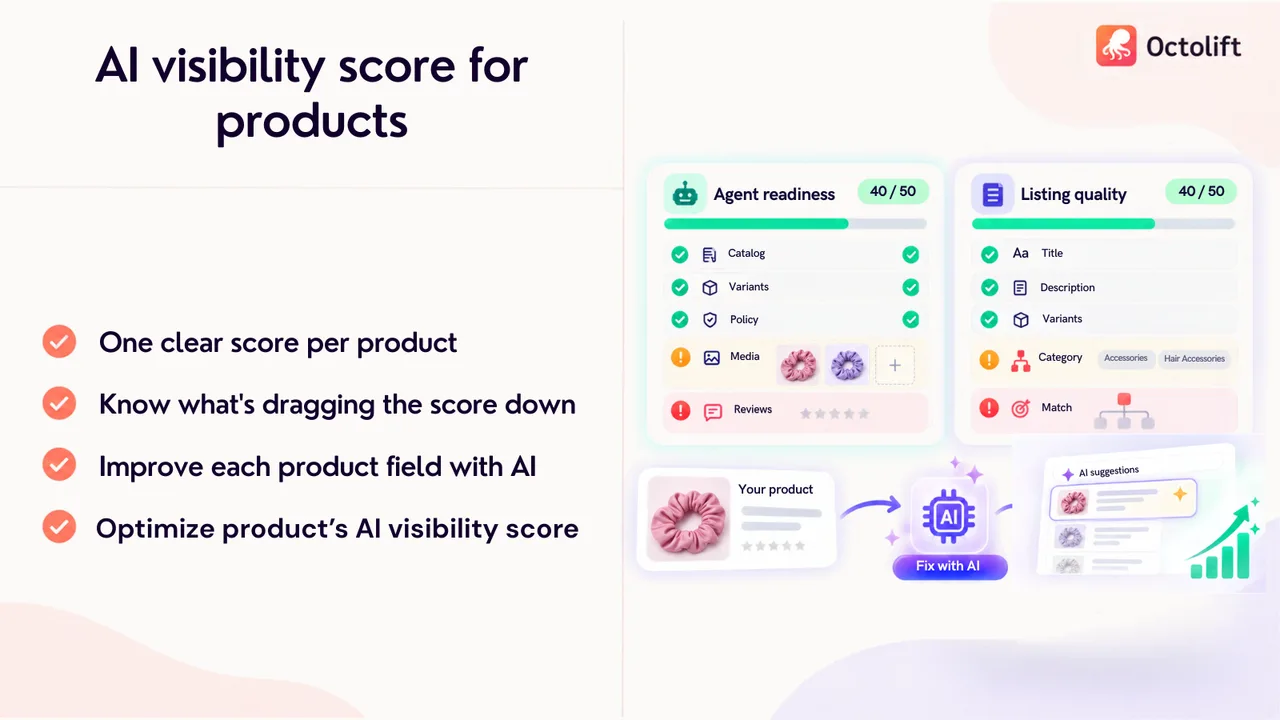
For BFCM, use it in this order:
- Score your offer products first. Analyze the products you will discount, and sort by the lowest score.
- Fix the text with AI. Improve with AI drafts better titles, descriptions and category values from your existing data and up to four product photos. It does not invent measurements or certifications, and nothing changes in your store until you apply a suggestion. Applied changes can be undone for 30 days.
- Rescan to confirm the new score, then add the photos it still asks for.
- Track shopper questions such as “merino base layer for hiking” to see whether ChatGPT and Gemini name your product, by country.
- Measure the weekend. Octolift reports sales and visits that came from AI assistants, so after Cyber Monday you can see what worked.
The free plan covers 5 products and 5 shopper questions, enough for your top BFCM offers. Our post on how AI shopping assistants read product images explains the Media quality check in detail.
What is a six-week BFCM plan for AI shopping agents?
| When (2026) | What to do |
|---|---|
| Week of October 19 | Pick your BFCM offer products. Export their images as a backup with Export Product Images. |
| Week of October 26 | Score the offer products in Octolift. List missing images, missing alt text and weak descriptions. |
| Week of November 2 | Shoot or edit the missing photos. Upload them in bulk with Smart Bulk Image Upload, with alt text. |
| Week of November 9 | Apply Octolift text suggestions for titles, descriptions and categories. Rescan. |
| Week of November 16 | Check shipping, return and holiday delivery pages. Add tracked shopper questions in Octolift. Export a second backup of the finished catalog. |
| Week of November 23 | Freeze catalog changes. Watch stock, orders and AI channel sales through Cyber Monday. |
What can these apps not do?
Being honest about limits matters on a deadline:
- No app can guarantee an AI recommendation. Assistant answers change between runs and countries. Better data makes a product easier to find and quote; it cannot force a pick.
- Export Product Images exports files, not product data. It does not export titles, prices or descriptions, and it does not change your store. For a product data backup, use Shopify’s own CSV export as well.
- Octolift does not create photos. It tells you which products need more images or alt text; the files come from you.
- Smart Bulk Image Upload needs a match. Files must carry an identifier (such as a SKU) or follow a naming rule the app can match.
- The Export Product Images and Octolift interfaces are in English.
Summary
BFCM 2026 runs November 27 to 30, and a growing share of shoppers will ask an AI assistant before they buy. Agents recommend the products they can read: three or more images with alt text, clear titles and descriptions, the right category, and confirmed stock and policies. Back up and audit your product media with Export Product Images, fill the image gaps with Smart Bulk Image Upload, and score and fix product data with Octolift, all before Black Friday week.
Install Export Product Images and export your first 100 files free this month, so you start your BFCM changes with a full copy of your product images.